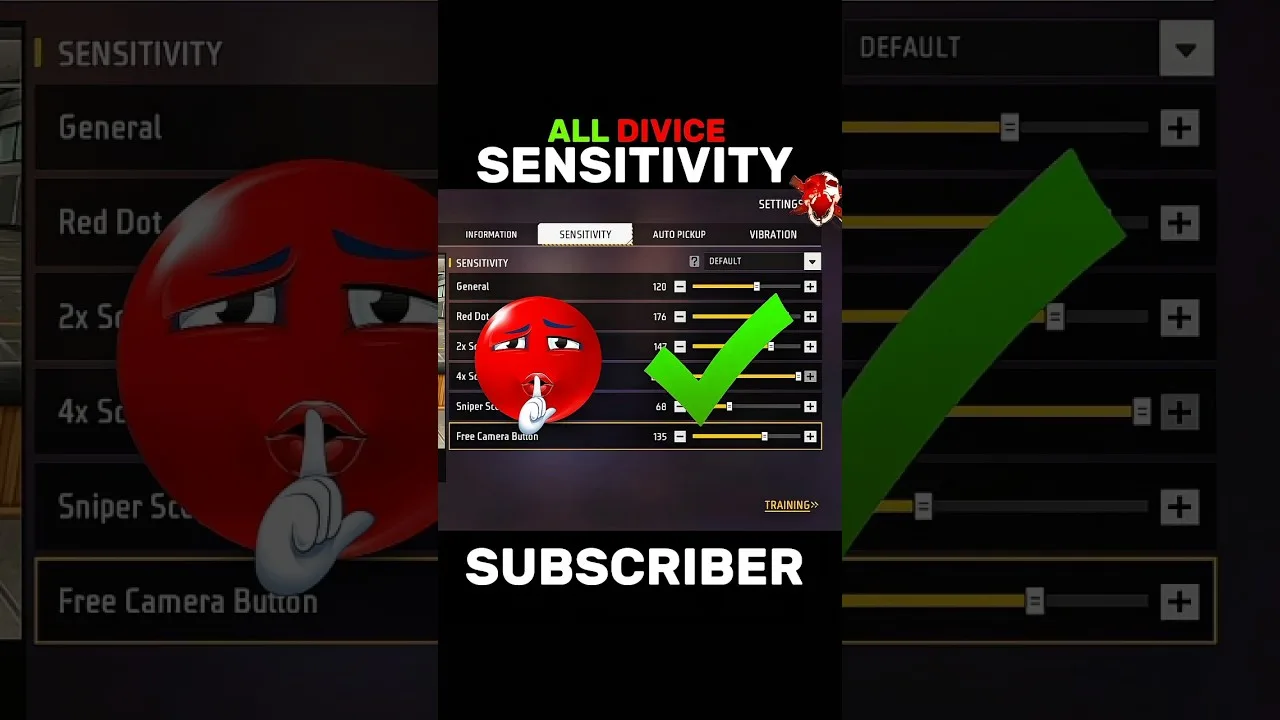
Sensitivity in Free Fire is the setting group that decides how far your crosshair travels for a given swipe on the screen. Small values feel slow and heavy, while large values feel fast and loose, and the right balance is the one that lets you turn quickly yet still stop precisely on a target.
Sadx Freestyle groups these values in one place so you can review them together instead of hunting through separate menus. Used as a Sadx Freestyle sensitivity tool, it helps you see your whole aim profile at a glance, which makes the tuning process calmer and far more logical than copying numbers from a stranger and hoping they suit your hands and your phone.
General Sensitivity Controls Your Everyday Movement
General sensitivity is the value you feel most often, because it shapes ordinary looking around, looting turns, and quick checks behind you. If it is too low, you will run out of screen space during close fights. If it is too high, every small thumb movement becomes an overshoot that you then have to correct.
A useful test is the full turn test in training: one comfortable swipe should rotate your view most of the way around without lifting your thumb. Adjust in small steps of three to five points, then play for several minutes before judging. General sensitivity interacts with everything else, so settle it first before touching the scope values that build on top of it.
Red Dot and Close Range Values
The red dot value governs aim when you are fighting at close to medium range without a magnified scope. This is where most drag headshot attempts happen, so the value needs to be fast enough for a short upward flick yet controlled enough to stop at head height instead of sailing above it.
Players often raise this value too aggressively after watching fast gameplay clips. A steadier approach is to raise it gradually across several sessions. The tips in the Sadx Freestyle headshot and drag settings guide pair well with this section, because drag technique and red dot speed only work when they are tuned together rather than in isolation.
Scope Values for 2x, 4x, and Sniper Play
Each magnified scope has its own value because magnification changes how movement appears on screen. A swipe that feels mild unscoped can feel wild through a 4x scope, since the view is zoomed and every thumb movement covers more apparent distance. That is why scope values usually sit lower than general sensitivity.
Tune scopes in the order you actually use them. Most players should settle 2x first, then 4x, and treat sniper values last because sniper fights are rarer and more deliberate. Change one scope at a time and test it on moving targets at realistic range, not on a static wall, so the judgement reflects real aiming rather than empty screen movement.
How DPI Fits Into the Picture
Sensitivity values do not work alone. Your phone DPI decides how many movement steps the screen reports, which changes how any given slider value feels in practice. Two phones with identical sensitivity numbers can feel noticeably different if their DPI values differ, which is why copied settings so often disappoint.
If your aim feels inconsistent even after careful slider work, DPI is the next thing to review. The explanation of what DPI means for Free Fire players breaks the topic into plain language and shows how to pair a sensible DPI with your sensitivity profile instead of treating them as separate puzzles.
A Calm Method for Finding Your Numbers
The most reliable method is boring on purpose: change one value, test for ten minutes, write down how it felt, and repeat. Keep notes inside or alongside the app so you can return to an earlier combination if a change makes things worse. Progress feels slower than random experimentation, but it actually reaches a good setup faster.
Judge changes across several fights, not one lucky or unlucky moment. Aim comfort builds over a session as your hands warm up, so a value that feels strange in the first minute may feel natural by the tenth. Patience here is a genuine skill, and it is the difference between a setup that serves you for months and one you rebuild every week.
Free Look and Supporting Values
Free look sensitivity controls how quickly the camera moves when you scan your surroundings without aiming, and it quietly shapes game sense. A comfortable free look value lets you check corners, watch for movement, and track the zone without disturbing the aim values you tuned so carefully for actual shooting.
Because free look never fires a shot, players often leave it wherever it started and then wonder why scanning feels sluggish or twitchy compared with the rest of their setup. Give it the same small step treatment as the other values, test it while moving through a built up area in training, and record the result alongside your main profile so the whole picture stays coherent.
Finally, expect your ideal values to drift slowly as you improve. A beginner's hands and a seasoned player's hands genuinely need different profiles, because faster, more confident swipes can hold higher values under control. Revisit this explanation every few months, rerun the same simple tests, and let the numbers follow your skill rather than freezing them at the level you happened to reach first. A sensitivity profile is a living part of your game, reviewed occasionally and changed rarely, and that rhythm is what keeps it feeling invisible in the best possible way while you play.
Final Thoughts
The best sensitivity settings are not a universal list of numbers but a profile matched to your phone, your DPI, and your hands. Sadx Freestyle makes that profile easy to review in one place, and a calm one change at a time method will get you to steady, confident aim far more reliably than copying someone else's setup.
Your download is ready
Use the APK link below and follow the install steps on this page.